Re: [jokosher-devel] [PATCH] InstrumentViewer volume slider patch (SVN Rev. 1519)
- From: Laszlo Pandy <laszlok2 gmail com>
- To: Jeff Ratliff <jefrat gmail com>
- Cc: jokosher-devel-list gnome org
- Subject: Re: [jokosher-devel] [PATCH] InstrumentViewer volume slider patch (SVN Rev. 1519)
- Date: Tue, 24 Jun 2008 09:59:49 -0400
Unfortunately reimplementing popup windows in Python using the current
version of GTK is not an option.
When you click the button in Totem, it creates a popup window which does
an X-pointer grab on the mouse. This means all mouse events will be
redirected to the popup window, even if the mouse is not on the window.
This is how the popup knows to disappear when you click somewhere else
on the screen.
When the popup window receives a mouse event, it gets the widget
associated with the event and see if that widget is part of the popup
window, otherwise it knows it is outside the window. However last time I
tried to do this with GTK, I found there is no Python API for getting
the originating widget from a GdkEvent. Therefore in Python you can do a
X-pointer grab, but you cannot tell if the user is clicking outside
your popup or not. And having a popup window continue to display while
the user frantically clicks around the screen trying to get out of it is
terrible for usability.
All this means is, if we are gonna use a popup volume control, it has to
be the stock GtkScaleButton.
Jeff Ratliff wrote:
Maybe you click it, a volume slider pops up, with a little icon for
"mute" at the bottom of the slider. I've seen this in other
applications. Seems like it would be pretty intuitive and useful.

On 24/06/2008, Laszlo Pandy <laszlok2 gmail com> wrote:
It is interesting that you mention putting a popup inside the mute button as
_less_ discoverable. Because I remember hearing from a few users who saw the
speaker icon and assumed it was a volume control, only to be surprised when
it was just mute.

I'm not sure if we can put both volume and mute in the same button, but if
it were volume I think it would be more useful.


Jeff Ratliff wrote:
Sorry, don't think I sent this to the list:

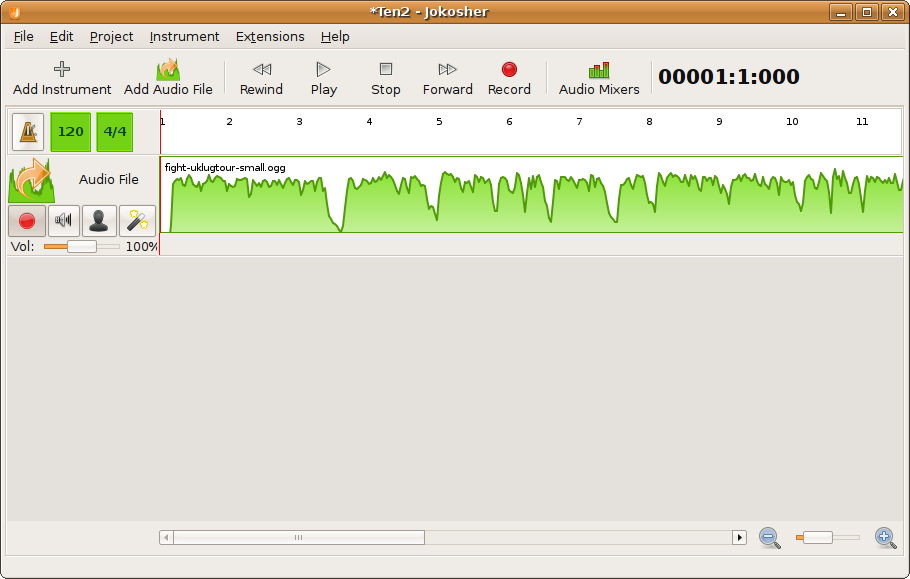
The volume slider in this position makes the think of a pan control,
not a volume control. This comes from my experience with physical
sound boards though, and a novice may not have this problem.

You could do a volume icon that pops up a volume slider, a la
rhythmbox and others. If you were really clever, you could find a way
to integrate it with the mute button and take up no additional space.
This is less discoverable though, and would really rely on a good
descriptive icon, or a little mini popup arrow thingy (excuse my
advanced technical jargon). :)

On 22/06/2008, Laszlo Pandy <laszlok2 gmail com> wrote:
Thanks for the patch Tom. This is really well done, and I think it
serves a
good purpose because currently the volume control is not as discoverable
as
it could be.

However right now the volume slider is underneath the buttons, which
looks a
little weird. Previously the buttons were at the bottom and they formed
a
nice straight line along the bottom of the instrument header. Also it
makes
the instrument lanes a little bigger; bigger than the events are. This
is
not as big a problem, we can certainly resize the height of the events
if we
need to.

I want everyone to take a look at the screenshot:
http://laszlopandy.com/files/volume-slider.png

Any suggestions for where else we could put it?

(I think there was previously a bug for having a recording monitor
vertically against the right side of the header, but a volume slider
requires more width and height than that).

Laszlo


Tom Halligan wrote:
Coded against SVN Revision 1519

Updated version of the instrument volume slider patch. The volume
slider
is now part of the ControlsBox. When creating the controls box, you
should
add a 'includeVolumeSlider=True' to the parameters. For example, the
code
used in InstrumentViewer.py is:
self.controlsBox =
ControlsBox.ControlsBox(project,mainview,instrument,includeEffects=True,includeVolumeSlider=True)
This means the volume slider is an optional control (for example, the
mixer strip omits the volume slider for obvious reasons).
Peace,
Tom
------------------------------------------------------------------------
_______________________________________________
jokosher-devel-list mailing list
jokosher-devel-list gnome org
http://mail.gnome.org/mailman/listinfo/jokosher-devel-list
_______________________________________________
jokosher-devel-list mailing list
jokosher-devel-list gnome org
http://mail.gnome.org/mailman/listinfo/jokosher-devel-list
[
Date Prev][
Date Next] [
Thread Prev][
Thread Next]
[
Thread Index]
[
Date Index]
[
Author Index]